start
your first ten minutes here
in the terminal: help start
First time here? Log in with the key you sent when you asked to join:
ssh you@runv.club
or with mosh, which keeps going on a bad connection and after your laptop wakes up:
mosh you@runv.club
The banner at login is the motd. motd shows it again, motd --party shows off, and touch ~/.hushlogin makes it stop.
Things to try in your first ten minutes:
help                              every topic, this one included
runv                              your dashboard (help runv)
nano ~/public_html/index.html     your web page (help web)
status "just got here"            say hello at runv.club/status
chat                              #runvclub on tilde.chat (help chat)
Editors: nano, vim, neovim, emacs and micro. Shells: bash, zsh and fish. Browsers for the terminal: lynx and w3m, and amfora for gemini.
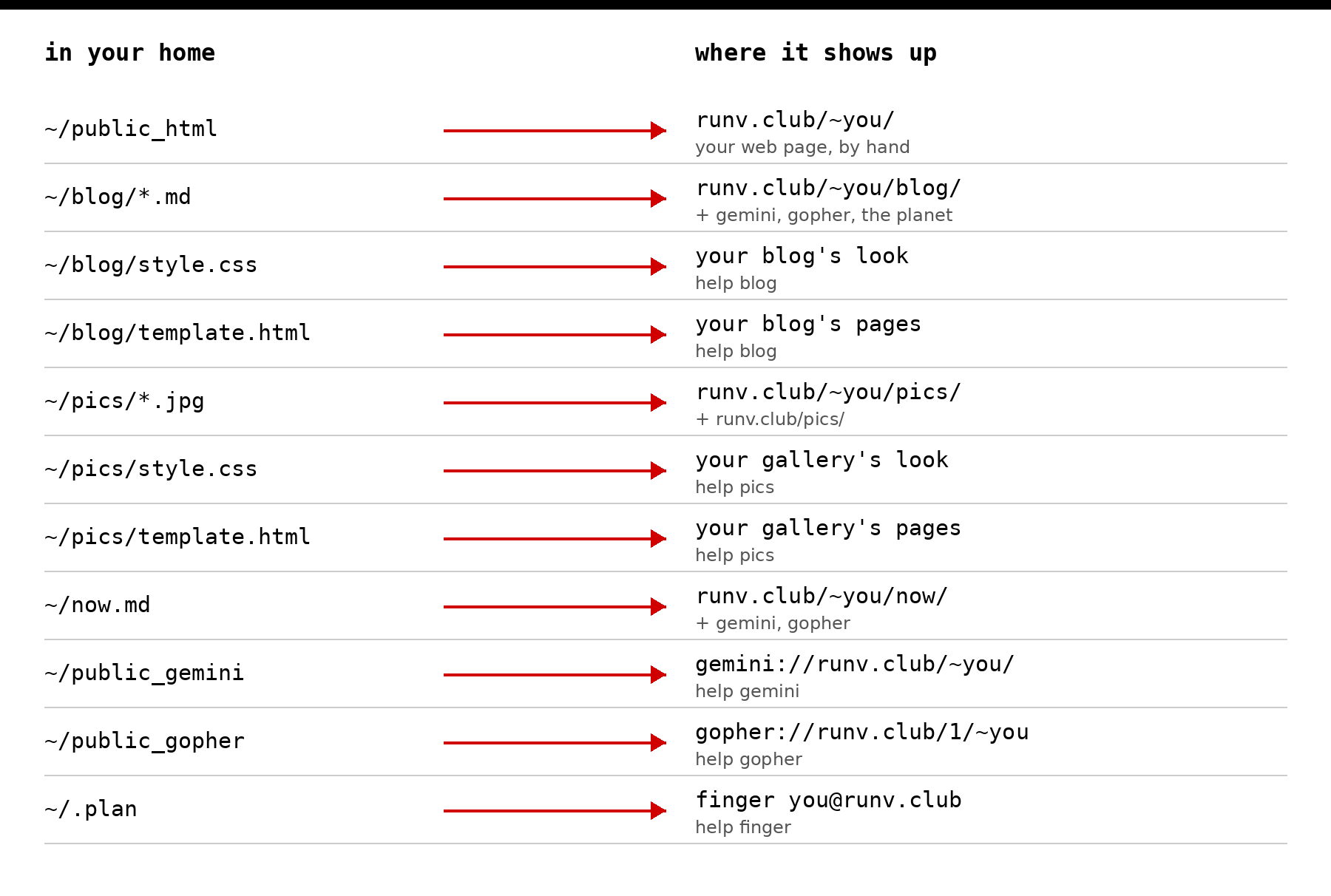
Your pages, your blog and your photos are all files in your home. Almost everything else here builds on that.
Where your files go. Everything here starts as a file in your home, and the server takes it from there:
New to the command line? Two things help a lot in the first week. man explains any command (man chmod, man ssh), and #runvclub is full of people who were new once (help chat).